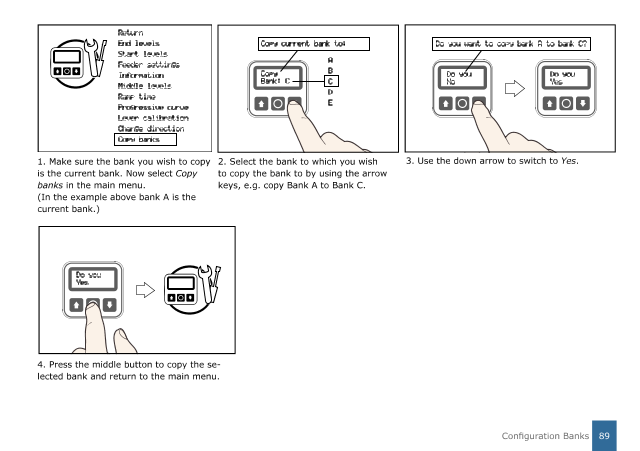
4. Press the middle button to copy the se-
lected bank and return to the main menu.
1. Make sure the bank you wish to copy
is the current bank. Now select
Copy
banks
in the main menu.
(In the example above bank A is the
current bank.)
2. Select the bank to which you wish
to copy the bank to by using the arrow
keys, e.g. copy Bank A to Bank C.
3. Use the down arrow to switch to
Yes
.
Return
End levels
Start levels
Feeder settings
Information
Middle levels
Ramp time
Progressive curve
Lever calibration
Change direction
Copy banks
Do you want to copy bank A to bank C?
Do you
No
Do you
Yes
Copy
Bank: C
Copy current bank to:
A
B
C
D
E
Do you
Yes
89
Configuration Banks